Draw Anime: AR Tracing App
- 4.7
- Rating
- 1.00M
- Installs
- Free
- Price
 Analysis by App-foxy
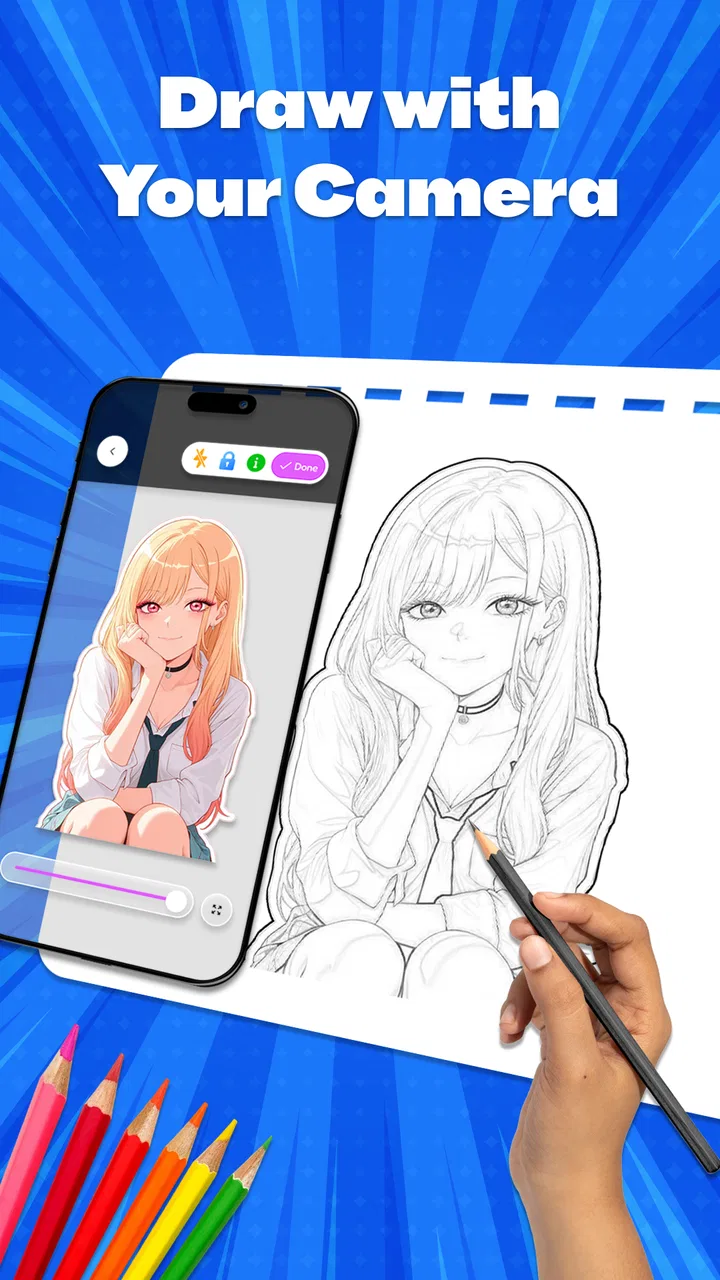
I spent time with Draw Anime: AR Tracing App as a practical drawing companion rather than treating it like a full digital art studio. That distinction matters. The app is built around helping you copy anime-inspired forms through AR tracing, guided steps, and simple sketching tools. If you have ever looked at a character reference and felt unsure where to begin, its approach is immediately understandable: place an image over your real drawing surface, follow the main shapes, and gradually build the result.
My first impression was that it aims to remove the intimidating blank page. Instead of asking you to remember every proportion at once, it gives you a visible structure to work from. That makes it especially approachable for beginners, younger artists, and anyone who wants a low-pressure way to practice anime faces, poses, or line work. It is a free Art & Design app from trimt, available for Everyone, and it has reached over a million installs with a 4.7 average from around eight thousand ratings.
That popularity does not automatically make it the right tool for every artist. AR tracing can teach observation and hand control, but it can also become a crutch if you only copy outlines and never study why the shapes work. My experience is that the app is most useful when I treat the projected image as scaffolding, not as the finished lesson. Used that way, it can make practice more inviting without pretending to replace fundamental drawing skills.
You May Also Like

 Blood Strike: 2.5 Anniversary
Blood Strike’s Loadouts Turn Every Drop Into a Tactical Gamble
A close look at Blood Strike’s custom loadouts: how fast access to signature weapons reshapes its battle royale rhythm, rewards preparation, and narrows the gap between fights.

 Pandora - Music & Podcasts
Pandora’s Music Is Easy to Start, but Harder to Recover
Pandora’s strength is its low-effort path from a seed to a station. Its weak spot is how much confidence it asks you to place in connection, setup, and quiet recovery.

 8 Ball Pool
 Is Built on Rivalries, Rematches, and Routine
A close look at the rivalries, rematches, shared routines, and unanswered safety questions that turn a quick pool match into a persistent mobile community.

 Samsung Music
’s Quiet Strength Is Playing What You Already Own
Its reach comes less from spectacle than from dependable access to a personal library. That simplicity is both the app’s strongest retention engine and its ceiling.

 AccuWeather: Weather Radar
AccuWeather Review: A Quick, Clear Forecast for Everyday Decisions
For everyday plans, the best forecast is the one you can understand quickly. AccuWeather makes rain timing, radar, and local conditions easy to act on, with a few trade-offs.

 Hill Climb Racing
Why Hill Climb Racing Still Turns Crashes Into One More Run
A tiny car, a bumpy hill and one more upgrade: Hill Climb Racing keeps resurfacing because its simple chaos makes every near-miss feel personal.
More From Our News Desk



How the tracing experience fits into real drawing practice
I find that the tracing setup works best when I treat each session as a small study, not a race to finish a picture. This section looks at how to prepare the workspace and turn the guided marks into practice I can reuse later. The next heading focuses on the hands-on routine, including a simple way to keep the phone from becoming a distraction.
Starting with a manageable reference
The strongest idea here is the way the app turns a complicated anime illustration into a sequence of smaller decisions. Rather than trying to reproduce hair, eyes, clothing, and expression in one attempt, I can begin with a rough head shape, establish the facial direction, and then add details. That order is important because beginners often spend too much time on the eyes before checking whether the head is tilted correctly.
The AR approach also changes how I look at the paper. A normal reference image sits beside the page, so my eyes constantly jump between two surfaces. With an overlay-style workflow, the reference and the drawing area occupy the same visual field. I can concentrate on where a curve begins and ends instead of repeatedly estimating its position. This is particularly helpful for large shapes such as the outline of hair or the angle of a shoulder.
I found that the method works best on a stable, uncluttered surface with consistent lighting. That is not a special feature claim; it is simply the practical reality of drawing through a phone camera. If the device shifts, the alignment shifts with it, and a carefully placed guideline can become confusing. I would therefore set up the phone before sharpening a pencil, rather than trying to hold the device in one hand while drawing with the other.
Why the step-by-step format helps
The clear steps are more valuable than they may sound. A beginner does not only need an image to copy; they need a sensible order of operations. When the process separates construction from detail, I am less likely to erase the whole drawing because one eye looks wrong. I can check the underlying proportions first, then refine the features after the foundation feels stable.
One useful habit is to pause after each broad stage and compare the drawing from a short distance. Up close, small details can make progress feel better than it really is. Stepping back reveals whether the face is balanced, whether the pose has a believable flow, and whether the hair is supporting the head rather than floating around it. The app makes this kind of staged practice natural because it encourages me to think in layers of difficulty.
I would not use the guided sequence as a rigid rule, though. Once I understand the construction, I can deliberately skip a detail or redraw a feature from memory. That turns a tracing exercise into a memory test. For example, I might trace the head and jaw, hide the reference for the eyes, and then draw them based on what I just observed. That small change helps prevent passive copying and gives the exercise more educational value.
Sketch tools for more than copying
The sketching side of the app gives the tracing process somewhere to go after the first outline. I can use the initial structure to experiment with expression, bangs, clothing folds, or a different line weight. This is where the app becomes more than a camera-based projection aid. The rough trace can serve as a disposable underdrawing while the final version develops in my own style.
A practical workflow is to make the first pass deliberately loose. I focus on placement and gesture instead of trying to create a clean illustration immediately. Then I use the sketch tools to correct the silhouette, simplify busy areas, and decide which lines deserve emphasis. This is more forgiving than pressing hard from the beginning, because the early marks are treated as guides rather than commitments.
There is also a useful trade-off here: simple tools can be less distracting, but they may not satisfy someone who expects a complete professional illustration environment. If your work depends on advanced layer management, detailed brush engines, sophisticated selection controls, or extensive post-processing, this app is unlikely to replace a dedicated drawing application. Its strength is the learning path from reference to sketch, not an expansive studio feature set.
Cost, value, and the limits of the free route
I would judge the free route by how often I actually draw and whether the available tools support that habit, rather than by how many options I might eventually unlock. Here I consider the difference between trying the app casually and relying on it as a regular practice aid. The following section weighs that value against the trade-offs of paying for individual items.
What the price actually means
The app is free to install, which makes trying the central drawing approach relatively easy. There is no need to commit money before discovering whether AR tracing suits your hand, your phone setup, or your learning style. That matters because this kind of workflow is personal: some people find an overlay intuitive, while others prefer a reference beside the page and more control over the canvas.
In-app purchases are listed at $9.99 per item. I would separate that fact from the free entry point. Free access gives the app its strongest value as an experiment and a beginner practice tool, while any paid item should be judged by whether it adds something you will use repeatedly. I would not buy simply because a locked option exists. I would first complete several drawing sessions with the available workflow and decide whether the app has become part of my routine.
That approach also avoids a common mistake with art apps: paying for possibilities rather than results. If I only draw once every few weeks, the free experience may already be enough. If I use the guided process several times a week and find that a paid item removes a specific obstacle, the purchase could be easier to justify. The important point is that the value depends on sustained practice, not on the novelty of seeing a projected image during the first session.
Where the app delivers value
The most convincing value is accessibility. A person who cannot yet judge anime proportions by eye can begin with visible guidance and gradually rely on it less. The app gives a concrete activity to do during a short break: choose a manageable reference, set up the phone, trace the construction, and finish one small study. That is more actionable than simply reading about facial guidelines or watching another lengthy tutorial.
It is also useful for testing ideas quickly. Suppose I want to explore a new hairstyle or pose but do not know how to start. A guided reference can provide the initial structure, after which I can change the expression or simplify the clothing. This lowers the cost of experimentation in time and frustration. I can produce a rough study without treating every mark as part of a final portfolio piece.
Another less obvious benefit is comparison between attempts. I can trace the same kind of face more than once, then intentionally alter the jaw width, eye spacing, or head angle. Looking at those versions side by side helps me notice patterns in my own mistakes. Perhaps I consistently make eyes too large, flatten the neck, or draw hair without considering the skull underneath. The app becomes more valuable when I use it to identify those habits rather than merely collect attractive copies.
Trade-offs that affect everyday use
AR tracing is not magic alignment. The phone must remain positioned so the projected reference stays useful, and that can make casual drawing less spontaneous than opening a normal canvas. A desk setup may work well, but drawing on a sofa, outdoors, or in a crowded room can be awkward. I would consider this before choosing the app as my only sketching tool.
The method can also create false confidence. A traced line may look accurate because the reference supplied its position, not because I understood the form. To counter that, I would finish every few sessions with a reference-free exercise: draw the same character type from memory, or create a new face using only the construction principles from the guided steps. If the result falls apart, that is useful feedback rather than a failure.
There is a second trade-off between speed and originality. The app can help me reach a recognizable anime drawing quickly, but copying too closely may leave little personal decision-making. I get better results when I use the reference for anatomy and placement, then change the hairstyle, clothing, expression, or composition. That turns the tool into a launchpad instead of a tracing machine.
Device compatibility is another practical consideration. The minimum requirement is Android 8.0, and the current version is 3.6. On a compatible phone, the experience will still depend on camera stability, screen visibility, and the physical space available for drawing. I would keep the phone plugged in for a longer session if the camera remains active, and I would avoid placing it where an accidental elbow can move the setup.
Who should use it and who should choose something else
My recommendation depends less on whether someone likes anime and more on how they prefer to learn: by tracing on paper, drawing on a screen, or studying a reference independently. This section helps match the app’s guided approach to a person’s goals and working style. The next heading makes the alternatives clearer, including situations where a conventional art app or structured lesson is a better fit.
A good match for beginners and casual anime practice
I would recommend it first to someone who says, “I want to draw anime, but I do not know what to practice.” The app gives that person a starting structure without demanding advanced knowledge. It is also a good fit for a student who wants short, repeatable exercises, a hobbyist exploring character design, or a parent looking for an age-appropriate creative activity. The Everyone content rating makes it broadly approachable, although the quality of a drawing session will still depend on supervision and the user’s own goals.
It can be especially helpful for people who learn visually and physically. Some learners understand a curve better when they can follow it with a pencil than when they see it explained in text. The combination of a visible reference and hand movement creates immediate feedback: if the line drifts, I can see the difference while making it. That direct connection may be more motivating than a blank digital canvas.
I also see value for artists returning after a long break. Starting with a guided anime study can rebuild confidence without requiring a polished original illustration. After a few sessions, I can use the app selectively for difficult areas, such as a turned head or a complicated fringe, while drawing the rest independently. That makes it a support tool rather than a permanent substitute for practice.
When another art app is better
I would skip it if my main goal were professional digital painting, detailed comic production, or fully original work without reference assistance. A dedicated illustration app is usually the better choice when I need precise editing, a deep brush library, advanced layers, or a workflow designed around finishing and exporting complex artwork. The simplicity that helps a beginner can feel restrictive to an experienced artist.
I would also choose a conventional drawing tutorial or anatomy resource if I wanted a deeper explanation of perspective, gesture, lighting, or construction theory. Guided tracing shows where to place marks, but it does not automatically explain every reason behind them. The app can support those studies, yet it should not be mistaken for a complete art curriculum.
Finally, people who dislike arranging a phone over paper may find the whole concept frustrating. A side-by-side reference, printed image, or standard digital canvas may feel more natural and give greater freedom to rotate, zoom, and redraw. The best alternative is not always more powerful; sometimes it is simply the one that lets you practice consistently.
My verdict after weighing the free access and paid value
After using it as a practice aid, I see Draw Anime: AR Tracing App as a focused beginner tool with a clear purpose. Its free starting point makes it easy to test, and the combination of AR guidance, sketch tools, and staged instruction can turn an intimidating subject into a sequence of manageable exercises. The app is most convincing when I use it to study proportions, compare attempts, and gradually remove the guidance.
The paid side deserves more caution. With in-app purchases priced at $9.99 per item, I would not treat every optional purchase as automatically good value. I would first decide whether I am drawing often enough to benefit from it and whether the specific addition improves a workflow I already enjoy. Free access is the sensible route for casual users, while committed beginners can consider paying only after the app proves useful over repeated sessions.
My final recommendation is therefore conditional but positive: try it if you want a friendly entry into anime drawing and are comfortable with a phone-based tracing setup. Use the overlay to understand structure, then challenge yourself to redraw without it. The best results come from treating tracing as a temporary guide, not as the destination. If you want a complete digital art studio or advanced control from the first stroke, choose a more specialized alternative instead.
For its intended audience, the app earns its place as a practical, low-pressure way to begin. It does not remove the need to practice, and it cannot replace artistic judgment, but it can make the first several steps feel possible. That is meaningful value for a free Art & Design app, especially when the user approaches each traced drawing as a lesson rather than merely a finished picture.
FAQs for Draw Anime: AR Tracing App
01What is Draw Anime: AR Tracing App?
Draw Anime: AR Tracing App is a unique application designed for both beginners and experienced artists who want to enhance their anime drawing skills. Utilizing augmented reality technology, the app overlays anime sketches onto your paper, enabling you to trace and learn the intricacies of anime art with ease and precision.
02How does the AR tracing feature work?
The AR tracing feature uses your device's camera to project anime sketches onto your drawing surface. Simply align your paper with the virtual guide, and trace over it to replicate the image. This innovative technology helps users learn proportions and details that are crucial in anime drawing, offering a hands-on learning experience.
03Is the app suitable for beginners?
Yes, Draw Anime: AR Tracing App is perfect for beginners. The app offers a variety of tutorials and step-by-step guides that cater to different skill levels. New users can start with simple drawings and gradually move to more complex characters and scenes, making it an ideal tool for learning and improvement.
04What devices are compatible with the app?
Draw Anime: AR Tracing App is compatible with most modern Android and iOS devices that support augmented reality features. Ensure your device's operating system is up to date to fully utilize all features. Check the app's requirements on the download page to confirm compatibility with your specific device.
05Are there in-app purchases or subscriptions?
The app offers a range of free features, but also includes optional in-app purchases for additional content, such as advanced tutorials, exclusive templates, and premium tools. Users can also opt for a subscription model that provides regular updates and access to new content, enhancing the drawing experience.
Pros
- Easy to use for beginners.
- Wide variety of anime templates.
- AR feature enhances creativity.
- Offline mode available.
- Regular updates with new content.
Cons
- Requires stable lighting for AR.
- Limited free templates.
- Ads can be intrusive.
- No support for landscape mode.
- Some features need in-app purchases.

Draw Anime: AR Tracing App
Gallery